DiVe
is a web-based event platform focused on an essential yet content-rich user-experience.
The platform is based on Amazon AWS servers and ensures maximum stability and scalability for any number of users to be connected from PC/Mac, tablets and smartphones.

Login
Di.Ve complies with the GDPR regulation and provides different Login modes to be compatible with the registration policy of all events.
The system supports 4 different options:
•Free registration
•Pre-registration
•Access codes
•Custom Login

Homepage
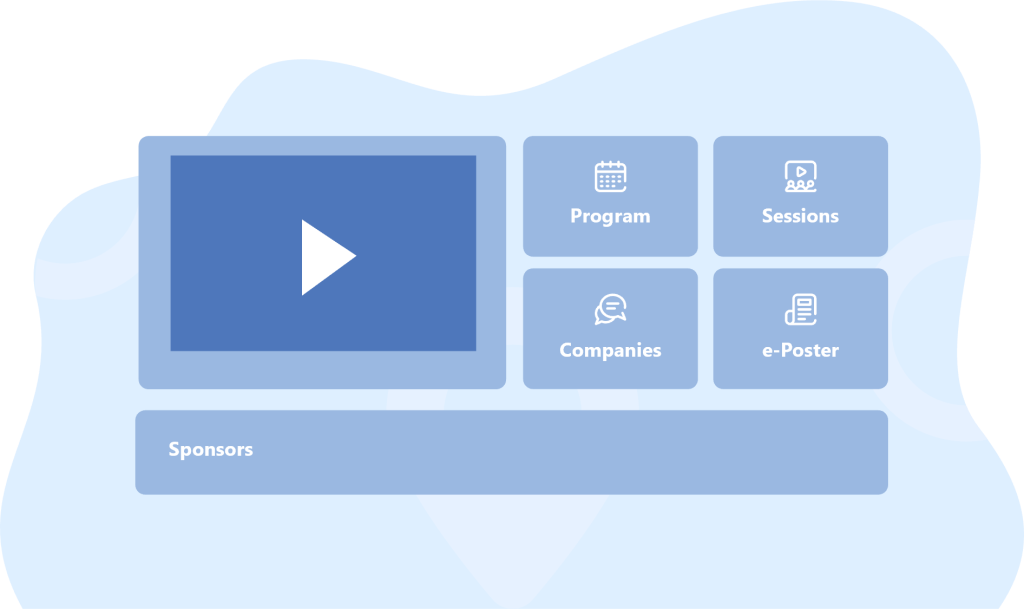
Once logged in, the user accesses a homepage where he/she can view all the sections of the platform. The structure of the homepage can be customized according to the functions that the organizer chooses to integrate, as well as the theme and the background graphics.
In the Welcome Area, the organizer can choose to insert a video content that is immediately visible to users, such as a welcome from the president of the association, a greeting from an authority or a teaser of the event.
In the sponsor bar all the Company logos are immediately visible for the congress delegates.
Program
An indexed program that may contain, in addition to the names of the speakers, moderators and the titles of the reports, also a brief description of the topics covered in the session itself.
The user can explore the program and save the sessions of greatest interest to his/her favorites.
In the program it is always visible which session is live and for the completed sessions it is possible to view the recordings as on demand.

Sessions
In this section it is possible to view the Live streaming/webinars, with one or more Live streaming channels, as well as the pre-recorded contents visible in on-demand mode.
For Live sessions, the platform is integrated with Zoom and Vimeo, thus giving users the opportunity to interact with written questions.
The contents in the on-demand section can be indexed, assigning one or more tags (keywords) to each content.
Sponsored Sessions/Symposia are easy to be identified on the program thanks to a graphic ribbon. They are also linked to the company virtual booth.
E-posters
This sections collects and shows all the
e-posters of the congress.
The platform is accessible to all authors 30-60 days before the congress to allow the authors to autonomously upload their posters in pdf format.
They can also insert up to 3 video links to their e-poster.
All e-posters are identifiable through Tag/keyword or Author Name.
Users will be able to view the posters, download them, save them as favorites and leave a comment and their contacts to the poster author who can choose to public the comment/question and reply.


ABSTRACTS
This area collects and shows all the abstracts of the congress.
The platform is accessible to authors 30-60 days before the congress to allow the
authors to autonomously upload their posters in pdf format.
They can also insert up to 3 video/audio files to their Abstracts.
All Abstracts are identifiable through Tag/keyword or Author Name.
Users will be able to view the posters, download them, save them as favorites and
leave a comment and their contacts to the poster author who can choose to public the comment/question and reply.
Companies / Exhibition
This function is designed to give visibility to the sponsors companies. Each company can upload any marketing contents in their own digital booth.
•Logo
•Graphic banner
•Description
•Contacts
•Pdf documents (brochures or product sheets)
•Videos
•Social networks direct links: Linkedin, Twitter, Youtube, Facebook and Instagram.
It is also possible to activate a one-to-one videochat function where exhibitors can speak in audio-video mode with users who are interested in that digital booth.

Meet the expert
Meet the Expert is the section of Di.Ve designed to encourage interaction between users and experts (Academics, Keynote Speakers, KOLs, Authorities, etc.).
Each expert will have a personal public are in which useful information will be visible:
•Bio
•Video
•Documents
•Abstracts
•E-posters
•Links to sessions in which the speaker has participated
Each expert can define his/hers availability with a simple Meeting Scheduler tool.
This shared calendar allows the booking of one-to-one meetings by the attendees, which will be held within the platform.
Forum
The Forum is a simple yet effective interaction tool
to allow the attendees to discuss on specific topics.
The topics can be chosen by the organizer or proposed by the participants.
The Organizer and the Administrator can always moderate the
contents removing offensive or inappropriate comments.

Social wall
The Social Wall collects and displays the best posts, photos or videos from all major social platforms such as LinkedIn, Twitter, Instagram, Facebook and YouTube.
By selecting the hashtags of the event, you can choose, collect and show the best posts, photos or videos published. Thanks to the moderation tool you can remove or highlight the posts to be displayed.
Chat
The Chat allows the attendees to create find other delegates.
The Organizer and the Administrator can create tematic chat rooms on specific topic.

Agenda
Agenda is the personal calendar integrated with the platform, users can better organize their user experience, finding listed the one-to-one appointments with companies or expert set and the previously saved sessions.
Favorites
All content within DiVe Congress such as e-posters, abstracts, brochures, and on-demand videos can be saved as “favorites” thus being collected in this dedicated section.

Help desk
In case of need, the user can visit the help desk section, where they can view the platform’s tutorials, frequently asked questions (FAQ) or contact support.
All the FAQs can be created from the Backoffice.
Statistic & Data
DiVe provides real time and after-congress statistic thanks to the integration with Google Analytics.
The available statistics are:
•Number of unique users per day
•Number of attendees per session
•Number of attendees per digital booth
•Number of downloaded documents
•Number of views of the e-poster
•Number of scheduled one-to-one meetings
•Favorites KPI
•Any custom statistic can be created if requested at least 15 days prior the beginning of the congress


Mobile App
Agenda is the personal calendar integrated with the platform, users can better organize their user experience, finding listed the one-to-one appointments with companies or expert set and the previously saved sessions.